| Author |
Message |
BAZZOOK

Joined: Sat Mar 24, 2007 10:30 pm Posts: 1052 Location: MORNINGTON. VIC

|
 Posted: Thu Apr 30, 2009 1:59 pm |
|
check this thread on Overlander.free Rasta topo maps, no good for garmin.
http://forums.overlander.com.au/viewtop ... &start=165
Vic topo map download. http://craighall.info/vic/
takes a long time to download but is free.
I think its easier to spend $160.00 on hema cd. to get ozi to work you need to pay at least $60.00 otherwise the trial version times out after 20mins. But it gives you a chance to have a play to see if it works.
|
|
|
|
|
Zook_Fan
az supporter

Joined: Thu Mar 13, 2008 10:30 pm Posts: 4530 Location: Toowoomba
Vehicle: Maruti and LJ80's
|
Posted: Thu Apr 30, 2009 2:20 pm |
|
Yeah i will check in at Harvey Norman's to see if they can do me a deal. Dad knows someone in the electronics department so i might be able to push it down to $199 if we try. If only supercheap had them i could get it real cheap with staff discount 
|
|
|
|
|
Pezooki
Joined: Wed Apr 15, 2009 11:30 pm Posts: 111 Location: SE Melbourne
Vehicle: 91 Sierra soft-top
|
Posted: Thu Apr 30, 2009 2:23 pm |
|
|
SuperCheap DO have them! (or they did)... I was in Devonport (Tas) 2 months ago and they had the Mio's on the shelf!
Pez.
_________________
91 Sierra soft-top.
|
|
|
|
|
Zook_Fan
az supporter
Joined: Thu Mar 13, 2008 10:30 pm Posts: 4530 Location: Toowoomba
Vehicle: Maruti and LJ80's
|
Posted: Thu Apr 30, 2009 2:28 pm |
|
|
Hmm might have a look there too. Will it only work with the 300's or could i go for one with a bigger screened one?
|
|
|
|
|
Pezooki
Joined: Wed Apr 15, 2009 11:30 pm Posts: 111 Location: SE Melbourne
Vehicle: 91 Sierra soft-top
|
Posted: Thu Apr 30, 2009 7:19 pm |
|
4.3" is the biggest sized screen you will find in a 'normal' GPS like a TomTom, Navman, Mio etc....
If you use a Mio then you can choose from a few different models, but the 300 appears to be one of the cheapest, and most reliable options. (It has the same 4.3" screen as all the others.) Check the MioPocket page to confirm Mio model compatibility. ALL of the info you should need is in the MioPocket page. Read it! http://www.gpspassion.com/FORUMSEN/topi ... _ID=109690
If you want a larger screen than 4.3" then you will have to look at the eBay 5" and 7" units that are available. Just remember that most of these eBay units will only accept a 2GB card (maximum). There is plenty of support available if you go down the Mio with MioPocket route, not so much if you have a problem with a no-name eBay device! If you are OK with computers, then you should be fine which ever way you go.
Pez
_________________
91 Sierra soft-top.
|
|
|
|
|
Zook_Fan
az supporter
Joined: Thu Mar 13, 2008 10:30 pm Posts: 4530 Location: Toowoomba
Vehicle: Maruti and LJ80's
|
Posted: Thu Apr 30, 2009 8:22 pm |
|
|
Ok fair enough i thought that the 360's or something had a larger screen. Will definately check out Supercheap next time i have the opportunity
|
|
|
|
|
royce
omnipotent being


Joined: Sun Jun 11, 2006 11:30 pm Posts: 17216 Location: Pluto
|
Posted: Thu Apr 30, 2009 11:20 pm |
|
|
having a bit of a flick through that that looks pretty interesting, the 4.3" screen especially if its transflective would be a lot more useful than 3.5" of a pda
|
|
|
|
|
Zook_Fan
az supporter
Joined: Thu Mar 13, 2008 10:30 pm Posts: 4530 Location: Toowoomba
Vehicle: Maruti and LJ80's
|
Posted: Fri Jun 05, 2009 9:31 pm |
|
|
I picked up my mio moov 300 today. Harvey Norman have them on special for $198 in case any one else is interested. I will get ozi soon and test it all out.
|
|
|
|
|
Pezooki
Joined: Wed Apr 15, 2009 11:30 pm Posts: 111 Location: SE Melbourne
Vehicle: 91 Sierra soft-top
|
Posted: Fri Jun 05, 2009 11:15 pm |
|
Zook_Fan wrote: I picked up my mio moov 300 today. Harvey Norman have them on special for $198 in case any one else is interested. I will get ozi soon and test it all out.
Nice work! Get MioPocket2.0 onto it and you will be laughing! The latest OziCE is AWESOME! It is probably the best $40 I have spent!
I ended up going with one of these units (because I couldn't get a Mio at the price I wanted). As it turns out, I am VERY happy with it:
http://www.dealextreme.com/details.dx/sku.23569
All for about $130AUD Delivered to your door!!! Postage is FREE. I had mine 10 days after I ordered it. 6 of my mates have now got one of these units - so far there has been no problems! 
Its a 5 inch screen with FM transmitter and bluetooth, running WinCE 5.0. I am running a 16GB SDHC card in it with no problems. I have modified and installed a different menu system onto this unit, which is working great. I am running OziExplorerCE and TomTom on my unit, as well as a heap of other applications such as MS Office etc... You can even pair it with your phone and use Internet Explorer to surf the net!
If anyone wants to go down this path, I will happily post up my modified menu's for you to download and use (without TomTom and Ozi installed of course - you will need to do this bit yourself!). My Modified menu/skin works MUCH better than the clunky menu/skin that the unit is sold with...
The best 'tech' resource for these units is here: http://tr.im/dxgps
Miopocket can be installed onto this unit too, however it is still in the 'development' stages. I am perfectly happy with how mine works now, so I will be leaving it alone! 
Cheers,
Pez
_________________
91 Sierra soft-top.
|
|
|
|
|
royce
omnipotent being
Joined: Sun Jun 11, 2006 11:30 pm Posts: 17216 Location: Pluto
|
Posted: Fri Jun 05, 2009 11:22 pm |
|
|
ey Pez, how does it go with ozi running a really big track file? that processor might be a bit on the slow side as I remember my old ipaq being a bit crap there (not that its a real issue)
do you think you could see if TCPMP and Mobipocket install on it ok? they are the only other things I would want to run on something like this!!!!
|
|
|
|
|
Pezooki
Joined: Wed Apr 15, 2009 11:30 pm Posts: 111 Location: SE Melbourne
Vehicle: 91 Sierra soft-top
|
Posted: Fri Jun 05, 2009 11:42 pm |
|
royce wrote: ey Pez, how does it go with ozi running a really big track file? that processor might be a bit on the slow side as I remember my old ipaq being a bit crap there (not that its a real issue)
do you think you could see if TCPMP and Mobipocket install on it ok? they are the only other things I would want to run on something like this!!!!
I have had no problems at all with Ozi on this device. I have had a track file of about 500km and there was no noticeable delay at all. The only thing that takes time is the "Index Maps" process. I indexed about 7GB of maps which took about 15mins to do. After this, everything just works!
I just copied Mobipocket out of the "Miopocket2.0" installation file (I have this file here on my PC and I have used some of the apps out of it on my GPS unit.) Mobipocket seems to run OK, but I do not have a copy of TCPMP to try. Both my modified menu/skin AND the standard one it comes with include an eBook reader and Music/Video/Flash players which all seem to work pretty well!
Cheers,
Pez
_________________
91 Sierra soft-top.
|
|
|
|
|
ryangus
Joined: Tue Apr 21, 2009 11:30 pm Posts: 287 Location: Brisbane
|
Posted: Sat Jun 06, 2009 1:01 am |
|
Hey Pez - thanks for the info. I currently use a PDA like Royce with Ozi and Tomtom, and have been looking around for another option for the wife. I buy heaps of stuff from DealExtreme, so might grab one of the units you have.
About the only issue I can see is the 2.5mm audio jack, but a cheap 2.5 to 3.5mm adapter can fix that. That will let me plug the device into the AUX of my car stereo.
I've also been looking at netbooks as a viable option. You can get the low-end eeePC now for about $250. The advantage as I see it would be faster CPU, 7" 800 x 480 screen, more support and "upgradability".
On the downside, it doesn't have a touchscreen or windscreen mount, so may be a bit more clumsy on the move. Obviously it doesn't have a built-in GPS either, so that would add to the cost, but DE do have USB GPSs for about $50. Also, you would need to use an inverter with this I imagine. Finally, I'm not sure what options there are for Windows XP street navigation.
Definitely food for thought!
BTW, TCPMP is free. You should be able to find it via here http://en.wikipedia.org/wiki/The_Core_P ... dia_Player. If not, send me a PM.
_________________
Regards,
Ranga
|
|
|
|
|
Zook_Fan
az supporter
Joined: Thu Mar 13, 2008 10:30 pm Posts: 4530 Location: Toowoomba
Vehicle: Maruti and LJ80's
|
Posted: Sat Jun 06, 2009 1:10 am |
|
Pezooki wrote: Nice work! Get MioPocket2.0 onto it and you will be laughing! The latest OziCE is AWESOME! It is probably the best $40 I have spent!
There is a new version now, MioPocket3.0 amd i have downloaded it but I can not get the unit to even recognise the SD card
|
|
|
|
|
Zook_Fan
az supporter
Joined: Thu Mar 13, 2008 10:30 pm Posts: 4530 Location: Toowoomba
Vehicle: Maruti and LJ80's
|
Posted: Sat Jun 06, 2009 1:26 am |
|
change that, got it working, it renamed the wrong file  . It looks awesome though, bit confusing to use though as it is a first. Will have to get ozi to have a play
|
|
|
|
|
Pezooki
Joined: Wed Apr 15, 2009 11:30 pm Posts: 111 Location: SE Melbourne
Vehicle: 91 Sierra soft-top
|
Posted: Sat Jun 06, 2009 1:52 am |
|
ryangus wrote: About the only issue I can see is the 2.5mm audio jack, but a cheap 2.5 to 3.5mm adapter can fix that. That will let me plug the device into the AUX of my car stereo.
There is nothing wrong with using the 2.5 to 3.5 adaptor. Dont forget that the DX unit has a built in FM Transmitter - that is, the unit can transmit all audio to the car stereo via the FM radio...
I will have a look at TCPMP - I am happy with the media players that I have, but one more cant hurt! 
You are right about the many options available too - at the end of the day its all about what u need the unit to do for you... WinXP navigation software will be hard to find. WinCE is definitely the go here!
Remember that I am happy to post up my customised menu's for you to download - if you want them!
Zook_Fan - yeah I see that MioPocket3.0 is out now. Looks good! I am still going to hold off on installing it on my unit, as I am very happy with the way mine is working for me! (One day when I get bored I will give it a go I'm sure...)
ALSO - FOR ALL SIERRA OWNERS! : You know the hole in the dash near the clock? The one you put your wallet in? The one that the original door broke off years ago??? With a bit of handy bracket modification, This 5 inch GPS will fit there perfectly! I am making a hinged bracket so that I can use the GPS unit as a door to this compartment! It will look pretty flash (and its a good spot for it to be)! I will post up pics when its done.
Cheers,
Pez
_________________
91 Sierra soft-top.
|
|
|
|
|
Zook_Fan
az supporter
Joined: Thu Mar 13, 2008 10:30 pm Posts: 4530 Location: Toowoomba
Vehicle: Maruti and LJ80's
|
Posted: Sat Jun 06, 2009 3:02 am |
|
|
yeah i wish mine was working smoothly it keep jumping back to the original software, and it wont recognise the oziexplorer.
whats the go with the ozi as well? are you supposed to install the Ozi CE onto the SD card while still using PC then put it into the unit? I have got both the PC and CE version now.
|
|
|
|
|
Pezooki
Joined: Wed Apr 15, 2009 11:30 pm Posts: 111 Location: SE Melbourne
Vehicle: 91 Sierra soft-top
|
Posted: Sat Jun 06, 2009 3:19 am |
|
You need this version:
"wince_core_runtime_arm.zip" - download it below:
http://www.oziexplorer3.com/ozice/downl ... me_arm.zip
YES you use your PC to copy the files onto the card.
Simply copy the extracted files onto the SD card (Under a folder called "OziCE") then run the .exe file! Its that easy!
Pez
_________________
91 Sierra soft-top.
|
|
|
|
|
ryangus
Joined: Tue Apr 21, 2009 11:30 pm Posts: 287 Location: Brisbane
|
Posted: Sat Jun 06, 2009 3:50 am |
|
Pezooki wrote:
Remember that I am happy to post up my customised menu's for you to download - if you want them!
Cheers,
Pez
Ordered one tonight from DX - would appreciate your menu if you don't mind posting it.
Thanks!
_________________
Regards,
Ranga
|
|
|
|
|
Pezooki
Joined: Wed Apr 15, 2009 11:30 pm Posts: 111 Location: SE Melbourne
Vehicle: 91 Sierra soft-top
|
Posted: Sat Jun 06, 2009 3:56 am |
|
|
No worries!
I will get it all ready on the weekend, upload it to Rapidshare and post the download links here...
Cheers,
Pez
_________________
91 Sierra soft-top.
|
|
|
|
|
Zook_Fan
az supporter
Joined: Thu Mar 13, 2008 10:30 pm Posts: 4530 Location: Toowoomba
Vehicle: Maruti and LJ80's
|
Posted: Sat Jun 06, 2009 4:06 am |
|
|
what maps are you guys running? anything decent for QLD for free?
|
|
|
|
|
royce
omnipotent being
Joined: Sun Jun 11, 2006 11:30 pm Posts: 17216 Location: Pluto
|
Posted: Sat Jun 06, 2009 1:34 pm |
|
you can upload it here, save mucking around waiting on rapidshare
http://www.auszookers.com/index.php?name=Downloads&c=13
just dont put any copywrited stuff up incase we get in trouble
I havent been following ozi development of late, will that version work with the developer version that allows you to setup your own screens?
zook_fan, have a look at maprequest, the only official rocky map I know of is a 250k one which is useless, once you figure it out maprequest will make you map sheets in area you want
|
|
|
|
|
Pezooki
Joined: Wed Apr 15, 2009 11:30 pm Posts: 111 Location: SE Melbourne
Vehicle: 91 Sierra soft-top
|
Posted: Sat Jun 06, 2009 2:58 pm |
|
OK I have uploaded the files to my NEW site: http://www.gpsunlock.net
Everything contained in these files is free open source stuff, so nobody is getting into trouble...
 Step 1)
When your new DX GPS unit arrives, it will probably have an old version of firmware on it. Before you continue onto the next steps you must update this firmware. Put the two files extracted from the RAR file below in the root of your SD card. Then, power off (not sleep) your GPS and turn it back on. A blue upgrade screen should appear. After upgrading, please remove the two upgrade files from the SD card. (This firmware update fixes some problems with the FM Transmitter.)
Here you will find the new firmware file: http://www.gpsunlock.net
If you loose your Bluetooth after this firmware upgrade then DO NOT panic - it will return in Step 3!
Step 2)
Now you can install my new "GPS Menu" program. This is the one that allows you to launch your multiple GPS programs (like TomTom and Ozi) / WindowsCE / Games / Apps etc...
All of the instructions are in the READ ME Text file included.
Here you will find my GPS Menu 'Version 1.0' with a BLUE color 'theme': http://www.gpsunlock.net
NEW - Version 2.0' of my GPS Menu is now available: http://www.gpsunlock.net
Ver2.0 is basically the same as Ver1.0 but with the following changes:
-The color 'theme' has been changed to a "Black" theme.
-The main "Programs" screen now has 4 program icons instead of 3.
-The Windows CE icon has been moved to the "Tools" menu.
Here is a screenshot:
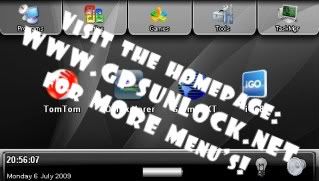
NOTE: There is a file called "SystemInformation32.exe" included in this "GPS Menu" that allows you to run it on a WinXP/Vista PC to see what it looks like first.... My GPS menu also includes some freeware Games / Tools / File Managers / Document Readers etc. to get you started.
Step 3)
Now it is time to replace the clunky (and ugly) standard menu/skin with a new sexy one . If you lost your Bluetooth in Step 1, then this will fix that too.
Again, all of the instructions are in the READ ME Text file included.
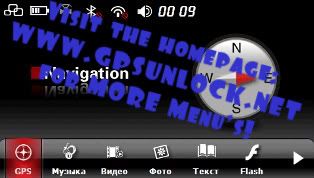
Here you will find the NEW menu/skin: http://www.gpsunlock.net
It looks like this:
All of that might seem a little confusing at first, but take your time and read the "READ ME" text file that I have included. If you do that, you will be fine!
Here is a video of the skin in action:
http://www.youtube.com/watch?v=DCg52ghn12k
Enjoy!
Pez
_________________
91 Sierra soft-top.
Last edited by Pezooki on Fri Dec 18, 2009 3:33 am, edited 5 times in total.
|
|
|
|
|
Pezooki
Joined: Wed Apr 15, 2009 11:30 pm Posts: 111 Location: SE Melbourne
Vehicle: 91 Sierra soft-top
|
Posted: Sat Jun 06, 2009 7:08 pm |
|
royce wrote:
I havent been following ozi development of late, will that version work with the developer version that allows you to setup your own screens?
royce - the new version of OziCE works with the screen designer - which is also available for download (for free) on the OziCE website.
zook_fan - Sorry I don't have (or know where to get) any decent free QLD maps.
Pez
_________________
91 Sierra soft-top.
|
|
|
|
|
Zook_Fan
az supporter
Joined: Thu Mar 13, 2008 10:30 pm Posts: 4530 Location: Toowoomba
Vehicle: Maruti and LJ80's
|
Posted: Sat Jun 06, 2009 8:32 pm |
|
|
I have now go that version of Ozi that you gave me and it is on the unit, i have inserted my serial and everything but it keeps coming up with "A GPS outputting NMEA data was not found" Anyone explain that to me? It is still on the demo map though and I am inside (no signal) if that has anything to do with it.
|
|
|
|
|
Pezooki
Joined: Wed Apr 15, 2009 11:30 pm Posts: 111 Location: SE Melbourne
Vehicle: 91 Sierra soft-top
|
Posted: Sat Jun 06, 2009 8:38 pm |
|
|
Hi Zook_Fan.
In OziCE, go into File>Configuration>NMEA (GPS) and check the settings.
Usually, in the Communications Port box, "Auto Find NMEA GPS" should do the trick. If not, you might need to manually tell the program where to find the GPS. It is most probably on COM1 at 4800 (or perhaps 9600). Have a play in there and you should get it working.
Good luck!
Pez
_________________
91 Sierra soft-top.
|
|
|
|
|
Zook_Fan
az supporter
Joined: Thu Mar 13, 2008 10:30 pm Posts: 4530 Location: Toowoomba
Vehicle: Maruti and LJ80's
|
Posted: Sat Jun 06, 2009 8:42 pm |
|
|
yeah it is was on the auto find thing but i could not find it. I will try and manually tell it, will it still give me a location on the demo world map if it does connect?
|
|
|
|
|
Pezooki
Joined: Wed Apr 15, 2009 11:30 pm Posts: 111 Location: SE Melbourne
Vehicle: 91 Sierra soft-top
|
Posted: Sat Jun 06, 2009 8:51 pm |
|
|
No worries. Yep it will put you in Australia when it gets a GPS fix. There is a GPS Status screen too - it will show you how many sat's you are seeing, and you can see the actual NMEA data there too...
I have not put Ozi On a Mio before, however it has been done and will work. You might need to try COM1 and COM2 at all baud rates from 4800 to 57600.
Pez
_________________
91 Sierra soft-top.
|
|
|
|
|
Zook_Fan
az supporter
Joined: Thu Mar 13, 2008 10:30 pm Posts: 4530 Location: Toowoomba
Vehicle: Maruti and LJ80's
|
Posted: Sat Jun 06, 2009 9:22 pm |
|
|
will it recognise the right port even if the gps isnt connecting to sattelites? will the having the mio maps going at the same time effect it?
|
|
|
|
|
Pezooki
Joined: Wed Apr 15, 2009 11:30 pm Posts: 111 Location: SE Melbourne
Vehicle: 91 Sierra soft-top
|
Posted: Sat Jun 06, 2009 9:30 pm |
|
|
I 'think' it pops up a message telling you that it has found the GPS when you get the settings correct... It makes no difference if you have satellite coverage or not. You are just trying to find the GPS receiver at this stage.
Having the mio maps running at the same time is not a good idea if you are trying to troubleshoot. Shut Mio maps down first (in case this is causing a conflict), then try again (starting with the 'Auto' setting.)
_________________
91 Sierra soft-top.
|
|
|
|
|
Zook_Fan
az supporter
Joined: Thu Mar 13, 2008 10:30 pm Posts: 4530 Location: Toowoomba
Vehicle: Maruti and LJ80's
|
Posted: Sat Jun 06, 2009 9:51 pm |
|
|
yeah auto setting still didnt work however i have got it to a stage where it has stopped telling me that error, it is just now saying that there was no data recieved from the gps. Which is expected because I know there is no coverage here. I think it is all good for the moment, just have to get some maps in there. thanks heaps
|
|
|
|
|
|


