| Author |
Message |
Pezooki

Joined: Wed Apr 15, 2009 11:30 pm Posts: 111 Location: SE Melbourne
Vehicle: 91 Sierra soft-top

|
 Posted: Tue Jun 16, 2009 7:53 pm |
|
ryangus wrote: Thanks mate - my version of OziCE doesn't seem to work, and also I can't seem to install your snazzy menu. I see no files under ResdientFlash2! I'll kepp tinkering.
Hmmm. Sounds like finger trouble!  Read the instructions I included and Im sure you will get it running. Also, use the download links I included in my earlier posts (ON PAGE 4 OF THIS THREAD)- that way it is sure to be compatible and work...
In WindowsCE in 'explorer' make sure that in the 'view' menu (I think), that the 'Hide System', 'Read Only' and 'Hidden files' options (there is 3 options) are all UN-TICKED!
Pez
_________________
91 Sierra soft-top.
Last edited by Pezooki on Tue Jun 16, 2009 9:34 pm, edited 2 times in total.
|
|
|
|
|
Pezooki
Joined: Wed Apr 15, 2009 11:30 pm Posts: 111 Location: SE Melbourne
Vehicle: 91 Sierra soft-top
|
Posted: Tue Jun 16, 2009 8:00 pm |
|
ryangus wrote: Also, my version of Tomtom 6 doesn't seem to work. It loads up fine, and let's me choose what country, but as soon as I tap the screen to navigate somewhere, it crashes...
What version Tomtom are you using, and what ROM version and Software Version is your device running?
I am running TomTom 7, with v815 maps.
The rom and software version I am running is a late one - it is the ones included in my earlier posts. It is much better and more stable than the version that the unit is shipped with (the one you are using now).
I dont have the version number of mine handy, however I can tell you that the numbering system that they have used for ROM and Firmware versions does not make any logical sense at all. For example, a version 7.10.12 can actually be OLDER than a 2.06.05 version, and so on........
Pez
_________________
91 Sierra soft-top.
|
|
|
|
|
ryangus
Joined: Tue Apr 21, 2009 11:30 pm Posts: 287 Location: Brisbane
|
Posted: Tue Jun 16, 2009 8:21 pm |
|
|
When I try and run MortScript, i get an error saying ".mscr and .mortrun extensions are not registered".
I've unticked all the options in the View menu - any other suggestions?
_________________
Regards,
Ranga
|
|
|
|
|
ryangus
Joined: Tue Apr 21, 2009 11:30 pm Posts: 287 Location: Brisbane
|
Posted: Tue Jun 16, 2009 8:26 pm |
|
|
Oops - my mistake, it actually says they're registered! I assume that's all I need to do.
So, left to fix are installing your menu (difficult considering I can't see the "YFAP30" folder (located in ResidentFlash2)).
Getting Tomtom working (I'll try my version 7 tonight).
OziCE - I'll try grabbing the latest version tonight.
_________________
Regards,
Ranga
|
|
|
|
|
Pezooki
Joined: Wed Apr 15, 2009 11:30 pm Posts: 111 Location: SE Melbourne
Vehicle: 91 Sierra soft-top
|
Posted: Tue Jun 16, 2009 8:31 pm |
|
Thank god for that! I was beginning to think that there was something very wrong there.... 
Keep at it and you will sort it out - BTW, there is NO files in the "ResidentFlash" folder - only in the "ResidentFlash2" folder, which is hidden and can only be found by clicking on ResidentFlash, and MANUALLY adding the number "2" using the keyboard.
The files must be there!
Again, when using WindowsCE Explorer, make sure that in the 'view' menu, that the 'Hide System', 'Read Only' and 'Hidden files' options are all UN-TICKED! (Im not sure of the exact text, but there is 3 options along those lines...)
Pez.
_________________
91 Sierra soft-top.
|
|
|
|
|
ryangus
Joined: Tue Apr 21, 2009 11:30 pm Posts: 287 Location: Brisbane
|
Posted: Wed Jun 17, 2009 11:16 am |
|
Pezooki wrote: BTW, there is NO files in the "ResidentFlash" folder - only in the "ResidentFlash2" folder, which is hidden and can only be found by clicking on ResidentFlash, and MANUALLY adding the number "2" using the keyboard.
The files must be there!
So, I assume you are getting to this folder by hooking up the device via ActiveSync? When I do that, I see the ResidentFlash folder, but can't rename it (and nothing happens when I press 2).
Also, I've found the device will not store the date changes I make. Every time I turn it on, the time has reset itself 
_________________
Regards,
Ranga
|
|
|
|
|
ryangus
Joined: Tue Apr 21, 2009 11:30 pm Posts: 287 Location: Brisbane
|
Posted: Wed Jun 17, 2009 11:26 am |
|
|
Ok, I sussed it out! I used WindowsExplorer, and used the keyboard in the bottom right of the screen (DUH!).
_________________
Regards,
Ranga
|
|
|
|
|
ryangus
Joined: Tue Apr 21, 2009 11:30 pm Posts: 287 Location: Brisbane
|
Posted: Wed Jun 17, 2009 11:33 am |
|
|
BTW, thanks for the skin, it's much sleeker than the original!
Now, to get Tomtom and Ozi working...
_________________
Regards,
Ranga
|
|
|
|
|
Pezooki
Joined: Wed Apr 15, 2009 11:30 pm Posts: 111 Location: SE Melbourne
Vehicle: 91 Sierra soft-top
|
Posted: Wed Jun 17, 2009 11:48 am |
|
|
Good stuff! I'm glad you like it!
Keep us posted!
BTW - You can turn ActiveSync mode OFF in the settings menu on the GPS, which enables "USB Storage" mode. This is much more useful 99% of the time!
Pez
_________________
91 Sierra soft-top.
|
|
|
|
|
ryangus
Joined: Tue Apr 21, 2009 11:30 pm Posts: 287 Location: Brisbane
|
Posted: Wed Jun 17, 2009 1:13 pm |
|
|
I'm slowly getting there. I was trying to use the version of Ozi that I use on my WM6 PDA. I didn't realise it's a different version to the one I need for WinCe. Ozi now seems to work OK. On to Tomtom!
Thanks again for your patience and help.
_________________
Regards,
Ranga
|
|
|
|
|
royce
omnipotent being

Joined: Sun Jun 11, 2006 11:30 pm Posts: 17216 Location: Pluto
|
Posted: Wed Jun 17, 2009 2:15 pm |
|
I have heard that the new version of ozi now rotates the maps as well, finally!!!
not looked yet as I changed my mind and bought a symbian phone so I have been lookinf at stuff for it 
|
|
|
|
|
ryangus
Joined: Tue Apr 21, 2009 11:30 pm Posts: 287 Location: Brisbane
|
Posted: Wed Jun 17, 2009 2:19 pm |
|
|
Pez - how did you install Tomtom? The version 6 I have for PDA doesn't require an install, you simply run the navigator.exe file and off it goes. Unfortunately, I'm getting an error after it boots and I try to choose somewhere to navigate to. It then crashes.
I just tried installing version 7, but got errors during installation and the installation crashed. Are there any tricks to this? I have both version 6 and 7, I just need to know how to install 7.
Thanks,
Ranga
_________________
Regards,
Ranga
|
|
|
|
|
Pezooki
Joined: Wed Apr 15, 2009 11:30 pm Posts: 111 Location: SE Melbourne
Vehicle: 91 Sierra soft-top
|
Posted: Wed Jun 17, 2009 2:52 pm |
|
|
royce - The New OziCE is great, and the map rotate and 3D options rock.
ryangus - PM Sent...
Cheers,
Pez
_________________
91 Sierra soft-top.
|
|
|
|
|
ryangus
Joined: Tue Apr 21, 2009 11:30 pm Posts: 287 Location: Brisbane
|
Posted: Wed Jun 17, 2009 3:02 pm |
|
Thanks again Pez, got your PM . Hopefully last question - at least for now 
Any idea why my date and time keeps resetting?
_________________
Regards,
Ranga
|
|
|
|
|
Pezooki
Joined: Wed Apr 15, 2009 11:30 pm Posts: 111 Location: SE Melbourne
Vehicle: 91 Sierra soft-top
|
Posted: Wed Jun 17, 2009 3:14 pm |
|
ryangus wrote: Any idea why my date and time keeps resetting?
Yes. This is normal and not a fault. The unit takes the time and date settings from the GPS. As soon as you get a GPS fix, the time and date settings are corrected (and your UTC offset is applied).
Cheers,
Pez
_________________
91 Sierra soft-top.
|
|
|
|
|
just_cruizin
az supporter

Joined: Sun Jun 25, 2006 11:30 pm Posts: 2867 Location: here
|
Posted: Sat Jun 27, 2009 1:34 am |
|
|
My GPS turned up today and I've got no idea on how to set it up, trying to work through Pez's instructions but I don't know where the "root" of the SD card is, too me a while before I could even get the computer to recognise the GPS.
Had to turn it to mass storage device. Is this correct?
_________________ greenzook89 wrote: 31zook wrote: Makes me want something similar
|
|
|
|
|
Zook_Fan
az supporter
Joined: Thu Mar 13, 2008 10:30 pm Posts: 4530 Location: Toowoomba
Vehicle: Maruti and LJ80's
|
Posted: Sat Jun 27, 2009 1:38 am |
|
|
the 'root' of the SD card is just putting the data straight onto the card but in no folder. In other words the root is the 'base' of the drive, the data has to go where you get located when you double click on the SD card in my computer.
Not too sure with the mass storage device part as I am using different stuff, but if it is anything like I have then yes you will have to have it in mass storage device or the computer will not recognise or it will try and load up some of the OEM software.
|
|
|
|
|
Pezooki
Joined: Wed Apr 15, 2009 11:30 pm Posts: 111 Location: SE Melbourne
Vehicle: 91 Sierra soft-top
|
Posted: Sat Jun 27, 2009 2:58 am |
|
just_cruizin wrote: My GPS turned up today and I've got no idea on how to set it up, trying to work through Pez's instructions but I don't know where the "root" of the SD card is, too me a while before I could even get the computer to recognise the GPS. Yep what Zook_Fan said. Just to clarify that a bit further though: If we say "copy OziCE to the root of the SD card", we mean to copy the entire actual "OziCE" FOLDER to the root of the card. Also, if you are using the GPS itself to access the SD card, the GPS will see the SD card as "SDMMC". It is therefore it is the '"SDMMC" directory that is the actual SD Card ROOT Directory! just_cruizin wrote: Had to turn it to mass storage device. Is this correct?
Yes - ActiveSync mode is only handy for creating backups. For what you are attempting to do the mass storage option is the way to go!
I hope all that helps, and doesn't confuse you further!
Pez
_________________
91 Sierra soft-top.
|
|
|
|
|
just_cruizin
az supporter
Joined: Sun Jun 25, 2006 11:30 pm Posts: 2867 Location: here
|
Posted: Sun Jun 28, 2009 2:50 am |
|
Big thanks to Pez and Zook_fan for getting me going   _________________ greenzook89 wrote: 31zook wrote: Makes me want something similar
|
|
|
|
|
Pezooki
Joined: Wed Apr 15, 2009 11:30 pm Posts: 111 Location: SE Melbourne
Vehicle: 91 Sierra soft-top
|
Posted: Tue Jul 07, 2009 2:10 am |
|
G'day all.
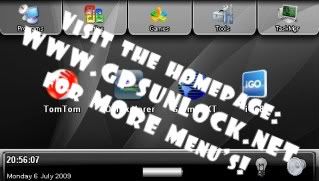
I have just updated the "how to' on Page 4 with the following:
NEW - Here is 'Version 2.0' of my GPS Menu: http://www.gpsunlock.net
Ver2.0 is basically the same as Ver1.0 but with the following changes:
-The color 'theme' has been changed to a "Black" theme.
-The main "Programs" screen now has 4 program icons instead of 3.
-The Windows CE icon has been moved to the "Tools" menu.
Here is a screenshot:
Cheers,
Pez
_________________
91 Sierra soft-top.
Last edited by Pezooki on Fri Dec 18, 2009 3:37 am, edited 1 time in total.
|
|
|
|
|
cruiserman
Joined: Mon Dec 15, 2008 10:30 pm Posts: 37 Location: Perth
|
Posted: Fri Jul 17, 2009 12:23 am |
|
|
Hi Guya,
awesome teach so far! I went the Deal Extreme route! Its a pretty awesome place to buy stuff from. The free delivery is quite entising! And they have a bucketload of stuff! Delivery was withing 9 days too!
I think I have followed all instructions properly and everything seems to be working well! I am trying to get a hold of the Tom Tom Navigator software....Anyone know where this can be found without falking out the $$$$$$$$$$$$$. Thanks in advance for all of your help!
|
|
|
|
|
cruiserman
Joined: Mon Dec 15, 2008 10:30 pm Posts: 37 Location: Perth
|
Posted: Fri Jul 17, 2009 12:45 am |
|
|
I also cant seem to find the ResisdentFlash2 to update the new skin.... where is it located?
|
|
|
|
|
Pezooki
Joined: Wed Apr 15, 2009 11:30 pm Posts: 111 Location: SE Melbourne
Vehicle: 91 Sierra soft-top
|
Posted: Mon Jul 20, 2009 4:45 am |
|
|
Hey cruiserman - PM sent.
ps- this forum is NOT the place to find (or ask for) dodgy software for your GPS device! You will need to look elsewhere for that...
Pez
_________________
91 Sierra soft-top.
|
|
|
|
|
cruiserman
Joined: Mon Dec 15, 2008 10:30 pm Posts: 37 Location: Perth
|
Posted: Mon Jul 20, 2009 2:08 pm |
|
Pezooki wrote: Hey cruiserman - PM sent.
ps- this forum is NOT the place to find (or ask for) dodgy software for your GPS device! You will need to look elsewhere for that...
Pez
Thanks Pez.
Good call on the dodgy software comment too. I was more interested in where to purchase it more then anything.
Got it all working now works a treat! New skin is flash too!
Thanks again mate!
|
|
|
|
|
Pezooki
Joined: Wed Apr 15, 2009 11:30 pm Posts: 111 Location: SE Melbourne
Vehicle: 91 Sierra soft-top
|
Posted: Mon Jul 20, 2009 2:36 pm |
|
|
Good stuff! Glad it's working for you - Enjoy!
Cheers,
Pez
_________________
91 Sierra soft-top.
|
|
|
|
|
CairnsZook
az supporter
Joined: Tue Jul 18, 2006 11:30 pm Posts: 872 Location: West Coast
Vehicle: Zookless
|
Posted: Wed Aug 19, 2009 1:03 am |
|
|
Hi Pez, I was running Ozi and TomTom on a PDA for a couple of years. It died a few weeks ago, so I picked up one of these GPS's.
I'm trying to install Ozi, but it keeps telling me there isn't enough space. Strange thing is, there is over 4GB of space, should be more than enough. Any ideas?
|
|
|
|
|
Zook_Fan
az supporter
Joined: Thu Mar 13, 2008 10:30 pm Posts: 4530 Location: Toowoomba
Vehicle: Maruti and LJ80's
|
Posted: Wed Aug 19, 2009 1:25 am |
|
|
you cannot use the pda ozi on these set ups. i dont know if this is your problem? if so jump on the ozi site and just get the demo for the right program and it should work
|
|
|
|
|
Pezooki
Joined: Wed Apr 15, 2009 11:30 pm Posts: 111 Location: SE Melbourne
Vehicle: 91 Sierra soft-top
|
Posted: Wed Aug 19, 2009 1:32 am |
|
Hi CairnsZook,
As Zook_Fan said, if you are trying to run a PDA version of Ozi, it will not work.
You need this version of OziCE: http://www.oziexplorer3.com/ozice/downl ... me_arm.zip
You don't actually "install" this version, just put it on your SD card and run the .exe file from there!
Let me know if you run into any dramas.
Cheers,
Pez
_________________
91 Sierra soft-top.
|
|
|
|
|
CairnsZook
az supporter
Joined: Tue Jul 18, 2006 11:30 pm Posts: 872 Location: West Coast
Vehicle: Zookless
|
Posted: Wed Aug 19, 2009 1:37 am |
|
|
Thanks Pez, I've found that and it's working!
Will I need a new version of TomTom as well? I was running version 6 on the PDA.
|
|
|
|
|
money_killer

Joined: Tue Jun 23, 2009 11:30 pm Posts: 301 Location: Sunshine Coast - Brisbane
Vehicle: 90 WT ST Locker, Tyres
|
Posted: Wed Aug 19, 2009 1:37 am |
|
|
bought a basic garmin the other day $280 i think i paid happy with it
|
|
|
|
|
|


